
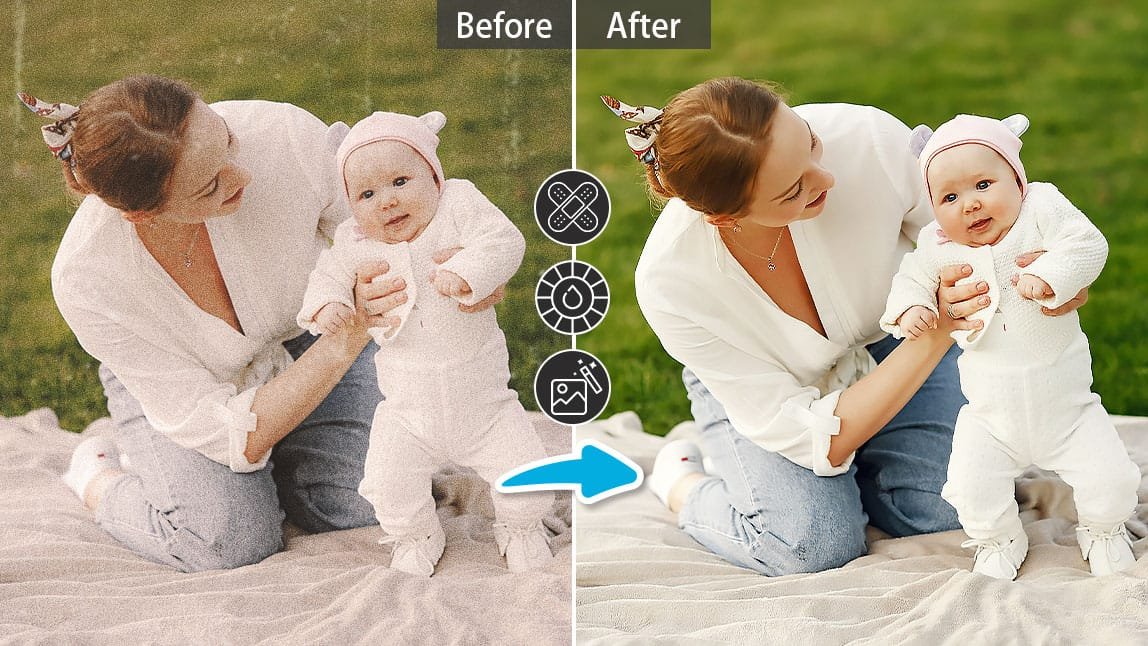
Remini App — The Ultimate AI Photo Enhancer
In today’s digital age, everyone loves sharing pictures. From old family albums to daily selfies, we want every photo to look perfect. But sometimes, old, blurry, or low-quality pictures can ruin our memories. That’s where Remini App comes in — a powerful AI tool designed to restore and enhance photos like never before.
What Is Remini App?
Remini is an AI-powered photo enhancement application that brings your old and damaged photos back to life. It uses advanced artificial intelligence and deep learning algorithms to sharpen images, fix blur, and enhance faces automatically. Whether you have a vintage family portrait or a pixelated selfie, Remini can turn it into a sharp, high-quality picture within seconds.
The app was launched in 2019 and has quickly become one of the most popular tools for photo enhancement. Available on Android, iOS, and the web, Remini is used by millions of people around the world for personal, creative, and professional purposes.
How Does Remini Work?
Remini uses AI-based image processing technology. When you upload a photo, the app scans it using a neural network trained on millions of high-quality images. The AI identifies faces, edges, colors, and patterns, then reconstructs the missing details that make a photo look clear and natural.
Here’s a step-by-step breakdown of how Remini works:
- Upload or select a photo – Choose any image from your phone gallery.
- AI analysis – The app automatically detects blur, low resolution, or facial imperfections.
- Enhancement process – Within seconds, Remini sharpens the image, restores details, and improves overall quality.
- Preview and save – You can preview the “before” and “after” images side by side and download the enhanced version.
The process is fast and requires no technical knowledge — just a few taps.
Key Features of Remini App
Remini offers a variety of impressive tools that make it more than just a simple photo enhancer. Here are the main features that make this app stand out:
1. AI Photo Enhancement
The main attraction of Remini is its photo enhancer. It can transform low-quality, grainy, or old photos into clear and detailed images. This feature is perfect for restoring old family pictures or improving photos taken with outdated cameras.
2. Face Enhancement
Remini focuses especially on faces. The AI enhances facial features like eyes, lips, skin tone, and hair texture while maintaining a natural look. This makes portraits and selfies look more realistic and professional.
3. Video Enhancement
Besides photos, Remini can also enhance videos. It can sharpen every frame, making the footage look high-definition. This is ideal for content creators, filmmakers, or anyone wanting to improve old home videos.
4. Batch Processing
In the premium version, Remini allows users to enhance multiple photos at once, saving time for professionals and photographers who handle large collections of images.
5. AI Portrait Mode
Remini can automatically apply portrait effects, such as background blur and skin smoothing. This feature is great for creating studio-quality portraits without expensive cameras or editing tools.
6. Comparison Slider
The app provides a before-and-after slider that lets users compare the original and enhanced versions easily. This shows just how powerful the AI technology really is.
Uses of Remini App
Remini isn’t only for fun; it has many real-world applications that benefit different types of users.
1. Personal Use
For individuals, Remini helps restore old photos, fix blurry selfies, and create better social media content. People love using it to relive their old memories with a new level of clarity.
2. Professional Photography
Photographers use Remini to enhance portraits, wedding photos, and client images quickly. It’s especially useful for improving photos shot in poor lighting conditions.
3. Social Media Creators
Influencers and content creators rely on Remini to improve image quality before uploading to platforms like Instagram, TikTok, and Facebook. Clearer photos attract more engagement and followers.
4. Historical Restoration
Remini is also useful for photo restoration projects. Museums, archivists, and historians use it to digitally repair old photographs, preserving history in digital form.
5. Business and Branding
Companies use Remini for marketing materials. Enhanced product images and professional portraits help create a strong brand impression.
Remini Free vs. Premium Version
Remini offers both free and premium plans.
Free Version
- Limited daily photo enhancements (usually one per day).
- Includes ads between processes.
- Access to basic tools only.
Premium Version
- Unlimited photo and video enhancements.
- Ad-free experience.
- Access to batch processing and higher-resolution output.
- Faster processing speed.
The premium version is available on a monthly or yearly subscription basis and is ideal for regular users or professionals.
Pros and Cons of Remini App
Like every app, Remini has its advantages and a few limitations. Here’s a quick comparison:
Pros
✅ Easy to use — no editing skills required.
✅ Works fast — enhances photos in seconds.
✅ Excellent AI face restoration.
✅ Restores old or damaged photos effectively.
✅ Available on Android, iOS, and desktop.
Cons
❌ Limited free version with ads.
❌ Sometimes over-smoothens faces, making them look artificial.
❌ Requires a stable internet connection since processing is cloud-based.
❌ Subscription can be expensive for casual users.
Privacy and Security
Since Remini uploads images to the cloud for AI processing, users often ask whether their photos are safe. The company claims that photos are processed securely and deleted after enhancement. However, like all cloud-based apps, it’s best to avoid uploading highly personal or confidential images.
Always read the app’s privacy policy to understand how your data is handled.
Tips for Best Results
Here are some quick tips to get the most out of Remini:
- Use the highest-quality original image you have.
- Ensure good lighting in the original photo if possible.
- Avoid extreme zooms or heavy crops before enhancement.
- Try enhancing once only — too many edits can make the photo look unrealistic.
- Save both versions — original and enhanced — for comparison.
Why Remini Is So Popular
Remini’s rise in popularity can be credited to its simplicity and effectiveness. Traditional photo editing requires skill and time, while Remini delivers professional-level results instantly. Social media trends also boosted its success — users frequently share before-and-after transformations, which naturally promote the app.
Its AI technology continuously improves, ensuring that photo restoration becomes more accurate and lifelike with each update.
Alternatives to Remini
If you’re exploring other options, here are a few apps similar to Remini:
- Fotor – Offers AI-based photo enhancement and filters.
- Adobe Photoshop Express – Good for manual editing and retouching.
- VanceAI – Online AI enhancer for detailed restoration.
- Pixlr – Provides free editing tools and AI enhancements.
However, Remini remains the easiest and most reliable for one-tap photo restoration.
Conclusion
The Remini App is a game-changer in the world of photo enhancement. Its advanced AI technology makes old, blurry, or low-quality images look clear, sharp, and vibrant within seconds. Whether you’re preserving old memories, improving social media content, or enhancing professional photos, Remini offers an effortless solution for everyone.
With millions of satisfied users, it’s clear that Remini has set a new standard in AI photo restoration — combining technology, creativity, and simplicity in one powerful app.
2025 Best Picture Enhancer: Elevate Your Photos Like a Pro
In the ever-evolving world of photography, 2025 has brought a new wave of picture enhancer apps that are revolutionizing how we edit and refine our images. Whether you’re a casual smartphone photographer or a content creator aiming for professional results, the right enhancer can make all the difference. This article dives into the best picture enhancer of 2025, its features, and why it’s leading the industry.
🌟 What is a Picture Enhancer?
A picture enhancer is a software tool or mobile application designed to improve the quality of photos through various AI-based and manual features. These apps can adjust brightness, sharpen details, enhance colors, remove noise, and even upscale resolution—all with just a few taps.
🏆 2025’s Top Pick: PixelPerfect AI Enhancer
Among the many contenders, PixelPerfect AI Enhancer has emerged as the most powerful and user-friendly photo enhancer of 2025. It combines advanced artificial intelligence with real-time editing tools to deliver flawless pictures instantly.
🔍 Key Features of PixelPerfect AI Enhancer
1. AI-Based Auto Enhancement
PixelPerfect uses machine learning to detect image flaws—like blurriness, underexposure, or poor contrast—and automatically fixes them without losing quality.
2. Ultra HD Resolution Upscaling
With one tap, users can convert low-resolution images into ultra HD without distortion. Ideal for printing or social media.
3. Face Retouching & Background Clarity
The app smartly enhances facial features while improving background sharpness, ensuring both foreground and scenery look professional.
4. Noise Reduction Technology
PixelPerfect reduces grain and noise in low-light photos, making night shots clearer than ever.
5. Color Boost & Light Correction
Adjusts hues, saturation, and highlights dynamically to give photos a rich and vibrant look.
🎯 Why PixelPerfect Stands Out in 2025
- Lightning-Fast Processing: No lags, even with large images.
- One-Tap Presets: Professional editing without the learning curve.
- Cross-Platform Sync: Available on iOS, Android, Windows, and macOS.
- Privacy First: No data stored on servers; all enhancements done on-device.
🧠 Other Honorable Mentions in 2025
1. Remini Pro 2025
Known for its face restoration and vintage photo enhancer, Remini continues to impress with its upgraded 2025 AI.
2. PhotoTune X
This app offers real-time AI suggestions, turning beginner photos into studio-grade shots within seconds.
3. LightFX Studio
LightFX is popular among creatives for its cinematic filters and custom LUT support.
📱 Best Use Cases for Picture Enhancers
- Enhancing Instagram photos and reels thumbnails
- Restoring old or blurry family pictures
- Making professional profile photos
- Improving product shots for e-commerce
💡 Tips for Using a Picture Enhancer Effectively
- Always use natural lighting in your original photos for better enhancement results.
- Combine manual edits with AI suggestions to add a personal touch.
- Save images in high resolution formats like PNG for better quality retention.
📥 Where to Download PixelPerfect AI Enhancer
- Android: Google Play Store – Search PixelPerfect AI Enhancer
- iOS: Apple App Store – Search PixelPerfect Pro
- Web App: Visit apksharp.com
🏁 Final Verdict
2025 is clearly the year of intelligent photo editing, and PixelPerfect AI Enhancer is at the forefront of this trend. With a perfect blend of simplicity, performance, and cutting-edge AI, it empowers everyone to create professional-grade images in seconds. Whether you’re refining selfies, boosting brand images, or restoring old memories, this is the tool to have in your arsenal.
______________________________
Download
___________________________________________________


